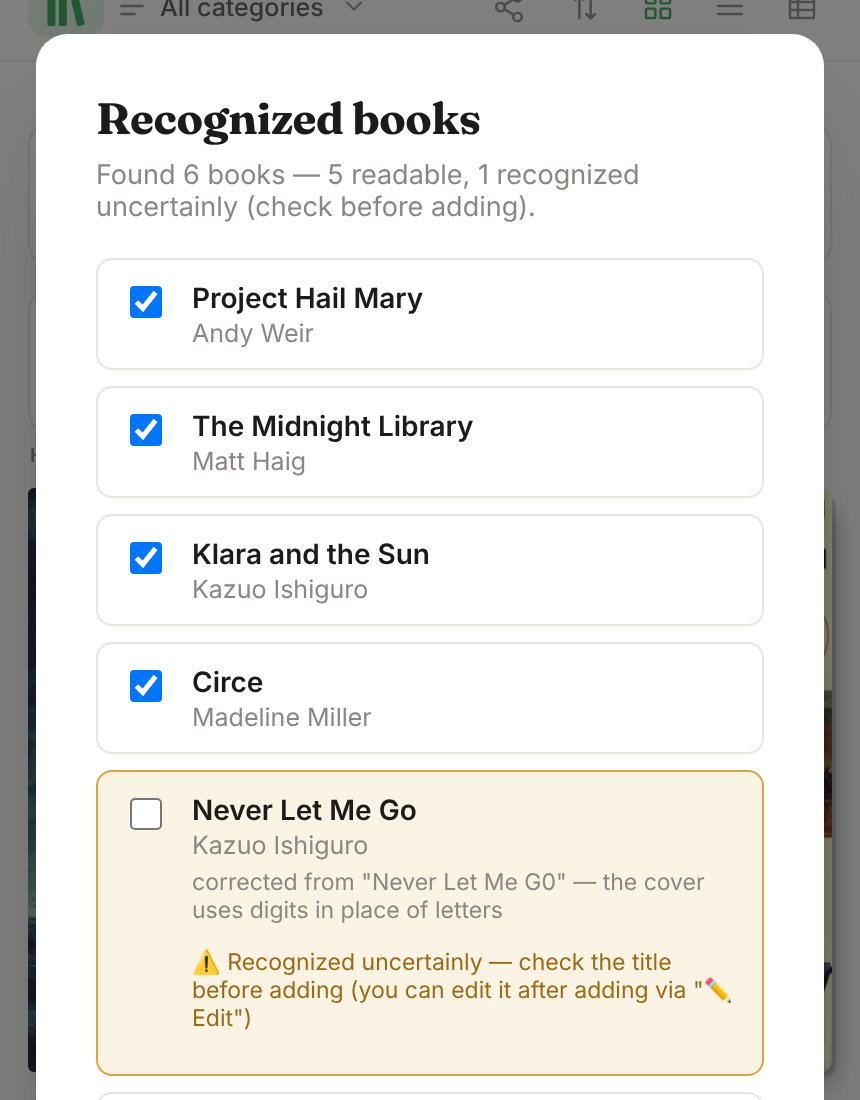
What shelf scanning does
You take a photo of a shelf. AI reads the titles and authors from the spines, and Libella then looks each book up in library catalogues to fill in the publisher, year, cover and description. Instead of scanning fifty barcodes, you take a few photos.
It is the fastest way to get a large collection started, and a practical way for books whose barcode is hidden, missing or was never printed.
How to take a photo that works
- Photograph the shelf in parts, about 5 to 6 books per photo. A whole shelf in one picture works when the spines are large and clear, but parts are recognised more accurately. Libella lets you take up to six photos in a row and collects the books from all of them.
- Straight on, not from the side. Stand in front of the books so the spines face the camera.
- Good light, no flash. Avoid glare from windows and lamps on glossy jackets.
- Readable spines. If you can't read a title in the photo, the AI probably can't either.
On a computer you can upload a photo from a file instead of using the camera.
After the photo: check, correct, then shelve
Reading books from a photo is never 100 per cent. Spines are narrow, worn or at an angle, titles are set vertically, a lamp reflects off a glossy jacket, and two books can lean so that one spine hides half of the next. AI recognises many of the books on a shelf, but a catalogue you can trust needs every record checked. So in Libella a shelf photo starts a short workflow instead of ending one:
- Everything lands on the To consider shelf, a private working shelf that does not count towards your library. Nothing is added to your catalogue yet.
- Check each record against the book: title, author and, if it matters to you, the publisher and year. The source library is shown with every record, so you can see where the data came from.
- Correct what is wrong. Edit a field by hand; scan the barcode or type the ISBN to pin down the exact edition; for an older book, photograph the copyright page; delete the occasional misread.
- Move the checked books to their shelf, one by one, or all at once with a single tap.
It takes a few minutes per shelf, far less than typing every book, and the result describes the copies you actually own. Why the edition matters is explained in which edition do I own?
Shelf photo or barcode?
Use both. They are good at different things.
| Shelf photo | Barcode scan | |
|---|---|---|
| Speed | Several books per photo | One book per scan (several in a row) |
| Exact edition | Needs checking | Yes, the ISBN identifies the edition |
| Books without a barcode | Yes | No (photograph the copyright page instead) |
| Cost | One free trial scan, then paid plans | Free |
A practical routine: photograph a shelf to get it in quickly, then scan the barcode of any book where the edition matters or the record looks wrong.
What it costs
Barcode scanning, title search and library lookups are always free. Shelf scanning uses AI:
- Free plan: one free trial shelf scan (up to 6 photos, no credits used) and up to 100 books in your library. Further shelf scans are in the paid plans.
- Lifetime (€29 once): 3,000 credits included; a shelf photo uses 80, so about 37 photos. More credits can be bought when needed.
- Libella AI (€2.99 a month, billed yearly): 5,000 credits every month, about 62 photos a month, for people cataloguing a big collection.
Frequently asked questions
How many books can one photo recognise?
It depends on the spines, the light and the distance. For the best accuracy, photograph about 5 to 6 books at a time; one photo covers one shelf at most.
Does it work with books in other languages?
Yes. Titles are read in any Latin-script language, and each book is looked up first in the national library of its language or country, among 24 catalogues in Europe and the US.
What if a book is recognised wrongly?
That is what the To consider shelf is for. Correct the record, scan its barcode, or delete it before it reaches your library.
Can I scan a shelf on my computer?
Yes, by uploading a photo you took with your phone or camera. Your library is the same on phone and computer.